Just this morning there was a submission to FamilySearch Community that came in Thai (using their own non Roman lettering)
example of lettering:
สวัสดีค่ะ ซิสเตอร์ชื่อ จันทร์จรัส อยากทราบว่าจะหาบันทึกหรือข้อมูลในการทำ Family Search ของบรรพบุรุษคนไทยได้ที่ไหนคะ
I was able to take the entire submission and bring up "Google translate"
and translate the entire query into English
Then later I was able to come up with my own response in English
and translate my response back to Thai - again using Google Translate.
"Machine
translation" as it is known - is very impressive - though will probably
not be perfect any time soon. But through this miracle we are
able to communicate with people around the world in basic
conversational language - even if we have no clue what they are saying
(at first) or even know how to read their non "roman-alphabet" language.
Here are some tips when using Google Translate to communicate with others
- Keep sentence structure simple but complete. (avoid complex sentences, run on sentences, partial sentences)
- Be sure to use correct spelling.
- Use, but dont over-use punctuation.
- Avoid idioms
Example: "He was pulling my leg" - Avoid sarcasm, irony, and being facetious
Example: "That was "bad!" <meaning it was great"> ) - Much humor will not translate (if it depends on puns/double meanings)
Example: "England has no kidney bank, but it does have a Liverpool." - Avoid ambiguity
I saw someone on the hill with a telescope. - Avoid terms that may not exist in the destination language/culture
Example: "We had Eggs Benedict for lunch" - Avoid "filler" words/phrases
Example: um, uh, er, ah, like, okay, right, and you know. - avoid double negatives
- Be sure and capitalize names
He was Frank. He was frank. - Some use of emoji's - to portray emotion is probably a good thing - and will normally be picked up across cultures. 🙂
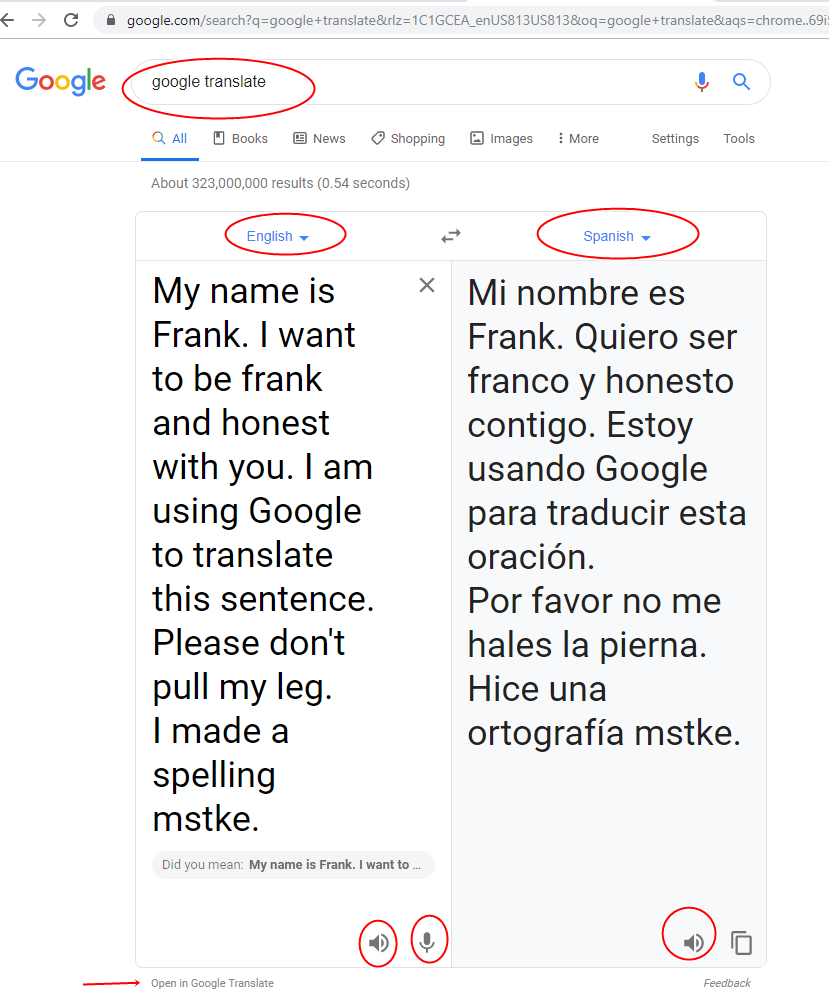
an example of Google translate
some of the later sentences showing some limitations